Every accounting product calls itself “AI-powered” now. After 10+ years running a CPA firm with 1,200+ small business clients, I can tell you most of those claims are marketing. Some of it is real. The gap between hype and reality is wider than most business owners realize, and that gap is where people overpay for tools that don’t do the work they were promised.
Here is what AI bookkeeping software actually does in 2026, where it saves you real hours, and where it still falls short.
What “AI bookkeeping” actually means
When a product says it uses AI for bookkeeping, it usually means one of three things.
First, transaction categorization. The software looks at the merchant name, amount and your history and predicts the category. If you bought from Adobe last month and called it “Software Subscriptions,” it’ll suggest the same category next month.
Second, document data extraction. You upload a PDF bill or a phone photo of a receipt. The software pulls the vendor, date, amount and line items into structured data. No retyping.
Third, matching and reconciliation. The software pairs invoices to bank deposits, bills to payments, and transfers across your accounts so the books tie out.
That is the real work. Anything beyond that – “AI tax strategy,” “AI CFO advice” – is usually a wrapper around a chatbot and should be evaluated with skepticism.
What it saves you
For a typical solopreneur with 50 to 150 monthly transactions, the math looks something like this.
- Manual categorization: about 30 seconds per transaction, so 100 transactions runs you close to an hour a month.
- Receipt matching: maybe 10 minutes a week looking for the right receipt at tax time, plus the inevitable lost ones.
- Reconciliation: one to two hours a month if you do it yourself, more if you skip months and have to catch up.
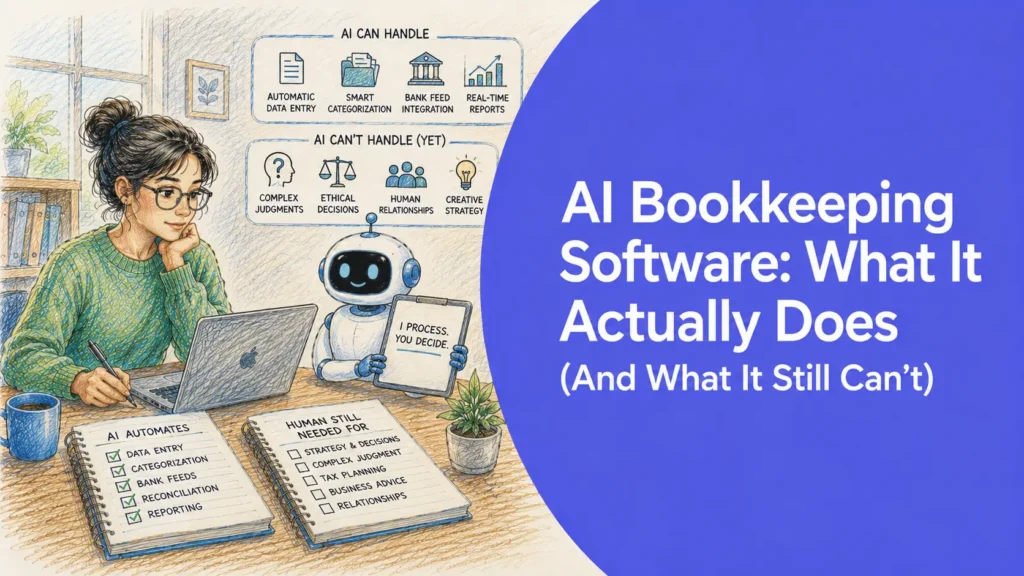
AI handles most categorization in seconds, suggests matches for receipts you upload, and auto-reconciles obvious deposits and transfers. Clients of mine who use AI bookkeeping software end up doing about 15 minutes a week instead of 4 to 6 hours a month. That isn’t magic. It is removing rote work.
The bigger benefit is something else: your books stay current. Not “I’ll catch up in February.” Current. Which means at tax time you are prepping a return, not reconstructing a year of transactions. The difference shows up in your tax bill too. Clients who keep current books capture roughly 15 to 20 percent more in legitimate deductions than clients who reconstruct at year-end, because the records exist and the deductions get claimed instead of forgotten.
Where AI still gets it wrong
I want to be honest here because too many companies are not.
AI guesses categories from patterns, and patterns can mislead. A $400 charge at Home Depot might be the cost of goods sold, an office supply, or a capital purchase depending on what you actually bought. The software cannot see inside the box. It guesses based on history, and history is not always right.
AI does not know your tax strategy. If you are an S-Corp owner taking distributions, if you have a home office deduction, if you are tracking mileage on a mixed-use vehicle – those decisions sit between you and your CPA. Software records what you tell it. It does not pick the strategy.
AI handles weird transactions poorly. Owner contributions, loan principal versus interest splits, customer refunds, sales tax remittances, payroll journal entries. Standard cases work well. Edge cases need a human eye, at least the first time.
In practice: AI bookkeeping cuts the work by 70 to 80 percent, not 100. Plan for a short weekly review and a 30-minute monthly close. You still want a CPA to look over your books at year-end. The software doesn’t replace that. It makes the review faster and cheaper.
What to actually compare when shopping
Most products on the market handle the basics. The real differentiators are these.
- Out-of-the-box categorization accuracy. Test on a month of your real data, not a demo file.
- How it handles payment processor fees. Can it match an invoice to a deposit when Stripe took a cut and added tax in between? This is where most tools fail.
- Internal transfers and credit card payments. Bad tools double-count these and quietly inflate your income or expenses.
- PDF bank statement upload for accounts without a clean feed.
Whether there is a real human you can reach when something breaks. AI fails silently. If you find out in April that a bank feed stopped syncing in June, that’s a problem the AI didn’t catch and you didn’t notice.
Who AI bookkeeping software actually fits
It is a strong fit if you are a freelancer, 1099 contractor, or solopreneur doing $50K to $500K in revenue, running a service business with mostly bank and card activity, and comfortable enough with technology to connect a bank feed and check a suggested category.
It is a poor fit if you are running heavy inventory across multiple ecommerce platforms (you need more specialized tools), running a multi-entity business with intercompany transfers (you need a controller, not just software), or two years behind with a shoebox of receipts (do a catch-up project first, then use software going forward).
AI bookkeeping is not going to replace your accountant. It is going to replace the four hours of categorization and receipt-hunting you currently waste every month. That is the right way to think about it.
That is what we built Tabby to do – automated bookkeeping designed by a CPA who actually does this work for a living. It is free to try. Connect a bank account and you’ll have a categorized P&L in under five minutes.