
- Tabby Talk · the AI agent inside Tabby
Describe the job. Tabby writes the invoice.
- 5,800+ businesses
- 99% categorization accuracy
- 10+ hours saved a month
- Customer: Acme
- 10 hours × $150.00 = $1,500.00
- Terms: Net 30
This preview runs in your browser. Inside Tabby, the AI also pulls the customer’s email, your saved rates and your sales tax from your books.
- Bill to
- Acme
- Invoice date
- Due date
| Item | Qty | Rate | Amount |
|---|---|---|---|
| ConsultingBilled per hour | 10 | $150.00 | $1,500.00 |
Trusted by 5,800+ small business owners
- The short answer
What is an AI invoice generator?
Definition
What you give it
One sentence, typed or spoken
What you get
A numbered, itemized invoice with a pay link
Time it takes
A few seconds to draft, one click to send
Cost in Tabby
5 invoices a month free. Unlimited from $30/mo
It writes the invoice
Customer, service, rate, tax and terms come from your own records. You don’t retype an address or look up what you charged last time.
It sends it and collects
The invoice goes out by email with card and ACH payment through Stripe. Customers who pay late get a reminder.
It does the bookkeeping after
The income is recorded and the bank deposit is matched to the invoice. A template or a chatbot stops at the PDF.

Reviewed by Ahad Ali, CPA · Updated October 2026
- How it works
How to create an invoice with AI in three steps.
- 1Invoice Acme for 10 hours of consulting at $150
Describe the job
Write it the way you’d say it to a bookkeeper. Name the customer, the work and the price.
- 2Found Acme Corp in your customers10 hrs × $150 = $1,500Net 30, due Nov 6
Check the draft
Tabby matches the customer and service to your books, applies your terms and tax, and shows you the invoice. Change any field you like.
- 3INV-1057 · $1,500To Acme CorpCreate and send
Approve and send
One click emails it with a pay link. Nothing leaves your account until you approve it.
- Inside Tabby
From one sentence to money in the bank.
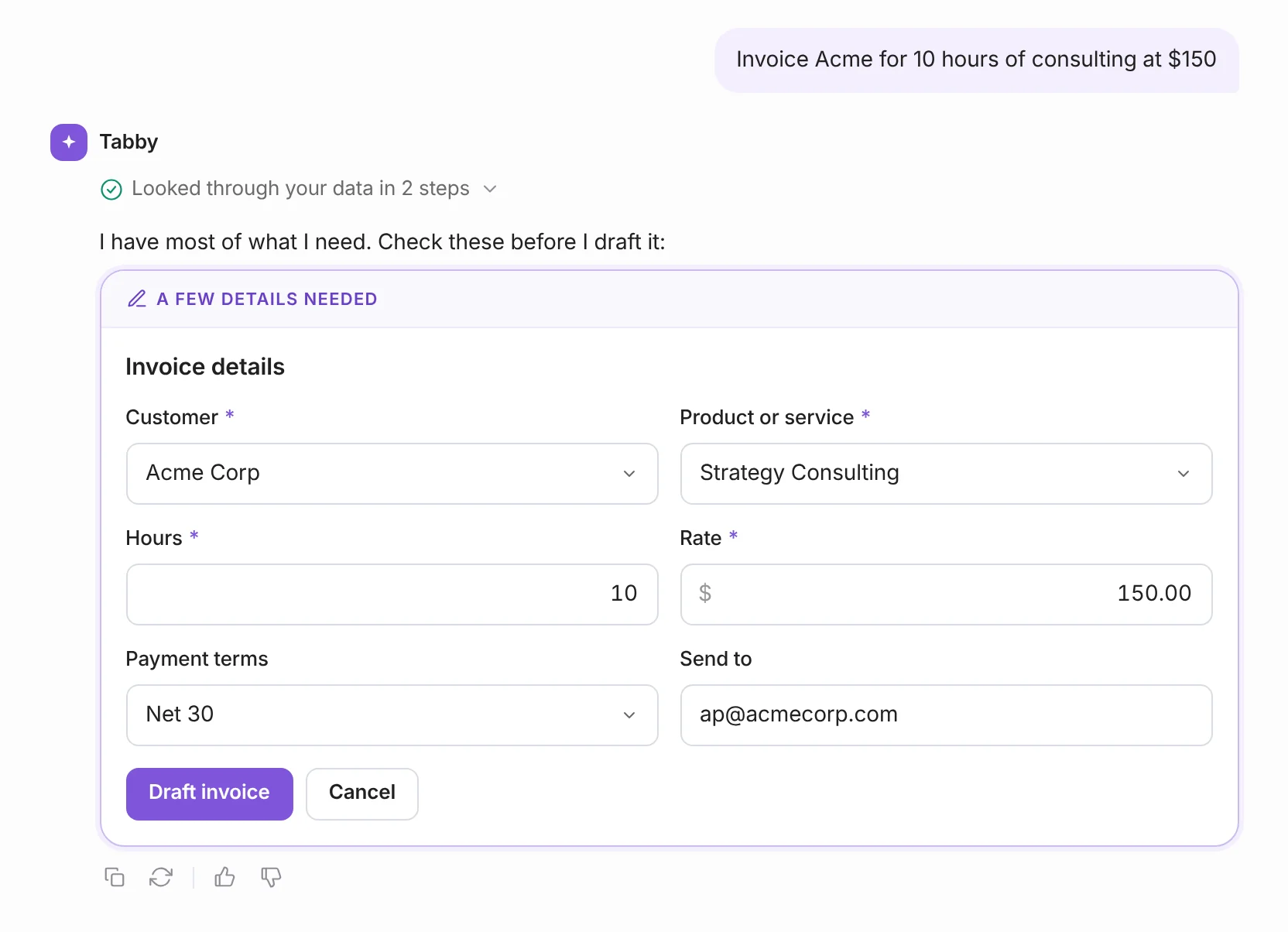
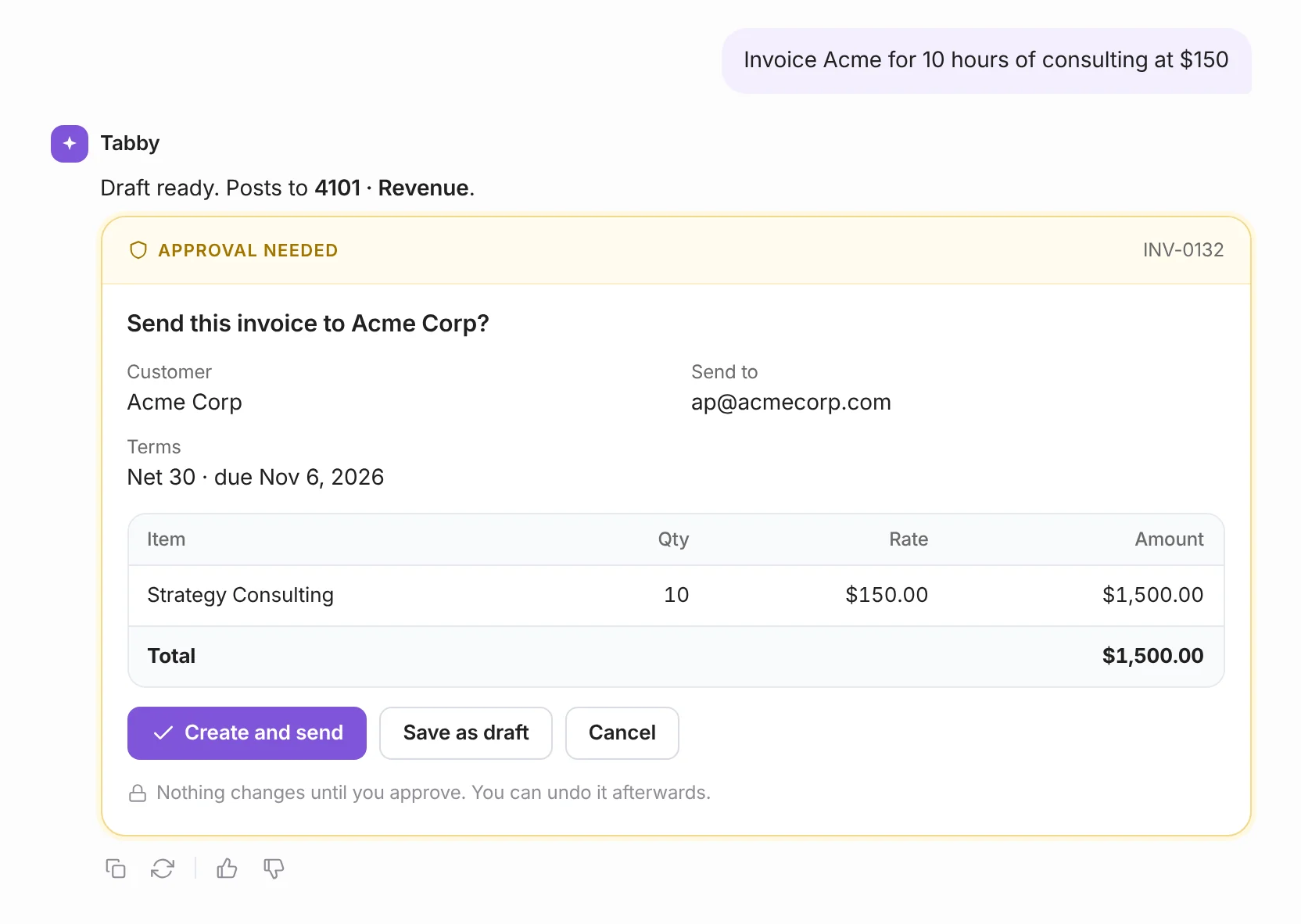
Tabby finds the customer, the service and your usual terms, then asks you to confirm.


- What’s included
More than a PDF. The whole billing job.
Recurring invoices
Put a retainer on a schedule. Tabby creates and sends it every month until you tell it to stop.
Card and ACH payments
Customers pay straight from the invoice through Stripe. There’s no separate checkout to set up.
Reminders that chase for you
Overdue invoices get a polite follow-up on a schedule you choose. You stop writing “just checking in” emails.
Sales tax worked out
Save your tax rates once. Tabby applies the right one to each line and shows the math on the invoice.
Your logo, your colors
Pick a template, add your logo and brand color, and rename columns to Hours, Rate or whatever fits your work.
Payments matched to your bank
When the deposit lands, Tabby links it to the invoice so your books and your bank agree.
Estimates and credit notes
Quote before you bill. If a job changes, issue a credit note instead of rewriting an old invoice.
Works from your phone
Send an invoice from the job site or the parking lot with the iPhone and Android apps.
- Copy and paste
AI invoice prompts that work as written.
Invoice Acme for 10 hours of strategy consulting at $150, net 30
Bill the Hendersons $4,200 for the bathroom remodel deposit, due on receipt
Invoice Northwind for the logo package at $1,800 and 2 extra revisions at $150 each
Send Beacon Health a recurring invoice for $2,400 on the 1st of every month
Invoice Park & Co for 3 site visits at $450 plus 8.875% sales tax
Chase everyone who is more than 7 days late
- Invoice basics
What every invoice needs. Tabby fills it in.
- Your business name and contactLegal or trade name, address, email and phone.Set once in Tabby, added to every invoice
- The customer’s name and addressThe person or company responsible for paying.Pulled from your customer list
- A unique invoice numberSequential numbers make invoices easy to find and hard to dispute.Numbered automatically
- Invoice date and due dateWhen you billed and when payment is expected.Due date worked out from your terms
- Payment termsNet 15, Net 30 or due on receipt, stated plainly.Your default applied, editable per invoice
- Itemized linesA description, quantity and rate for each product or service.Matched to your saved services and rates
- Subtotal, tax and totalSales tax shown separately where it applies.Calculated for you, with the math shown
- How to payThe methods you accept and where to send payment.Card and ACH link on the invoice
- PO number, if they use oneLarger customers often won’t process an invoice without it.Optional field on every invoice
- How the options compare
AI invoice generator vs. templates vs. ChatGPT.
Swipe the table to compare
| What you need | Tabby | Word, Excel or PDF templates | ChatGPT and other chatbots | Standalone invoice generators |
|---|---|---|---|---|
| Drafts an invoice from one sentence | Some | |||
| Knows your customers, rates and terms | Some | |||
| Numbers invoices in sequence for you | Some | |||
| Emails the invoice and takes card or ACH | Some | |||
| Sends payment reminders | Some | |||
| Records the income in your books | Rarely | |||
| Matches the bank deposit to the invoice | ||||
| Free to start | 5 invoices a month | Usually |
- Who it’s for
Built for people who bill between jobs.
Freelancers and consultants
Bill hours, retainers and project milestones without opening a spreadsheet. Your rate and terms are already saved.
Contractors and home services
Send the deposit invoice before you leave the driveway and the final one the day the job wraps.
Agencies and small teams
Monthly retainers go out on their own and one list shows who’s paid, who’s late and what’s still a draft.
See how Tabby fits your work: consultants and coaches, contractors and small businesses.
- What it costs
Free for your first five invoices every month.
No credit card required
- 5 invoices a month
- Card and ACH payments through Stripe
- 10 Tabby Talk AI credits a month
- 1 bank connection and AI categorization
50% off your first 3 months, or save 20% yearly
- Unlimited invoices and estimates
- 250 Tabby Talk AI credits a month
- Payments matched to bank deposits by AI
- 3 bank connections and an accountant seat
Invoices you build with the form don’t use AI credits. Every paid plan has a 30-day money-back guarantee. Compare all plans →
- Why you can trust it
An accountant’s judgment. Your final say.
Ahad Ali, CPA
Co-founder, Tabby · NY, USA
12+
1,500+
CPA
You stay in control
Nothing sends without approval
Every invoice and reminder waits for your OK.
Read-only bank access
Tabby can see transactions. It can never move money.
AES-256 encryption
Your data is encrypted in transit and at rest.
Your invoices, portable
Download any invoice as a PDF and export your list anytime.
- Questions
AI invoice generator questions, answered.
An AI invoice generator is software that turns a plain-English description of a job into a finished invoice. You type something like “Invoice Acme for 10 hours of consulting at $150,” and it fills in the customer, line items, quantity, rate, tax and due date. Tabby’s version also sends the invoice, takes card and ACH payments and records the income in your books.
In Tabby, open Tabby Talk and describe the job in one sentence: who you’re billing, what for and how much. Tabby shows the details it found, such as the customer, the service, your rate and Net 30 terms. Check them, select Draft invoice, then approve it to send. It usually takes less than a minute.
Yes. The Free plan includes 5 invoices a month, card and ACH payments through Stripe and 10 Tabby Talk AI credits, with no credit card required. The Standard plan is $30 a month for unlimited invoices and estimates and 250 AI credits, and it’s 50% off for your first 3 months.
ChatGPT can write the text of an invoice or fill in a template if you give it every detail. It can’t look up your customer’s billing address, keep your invoice numbers in sequence, email the invoice, take a payment or record the income, so you’d still do each of those by hand. An AI invoice generator inside your bookkeeping software handles them in one step.
No. Tabby drafts the invoice and shows you exactly what it’s about to send. Nothing goes to your customer until you approve it, and you can save it as a draft or cancel instead.
Yes. Every field stays editable. Change the customer, line items, rate, tax, terms or due date before you send, or open the full invoice form to add a PO number, more line items or a recurring schedule.
Yes. Customers can pay by credit card or ACH bank transfer through Stripe on every plan, including Free. On paid plans, Tabby also matches the bank deposit to the invoice automatically.
Yes to both. Set an invoice to repeat on a schedule, such as every month, and Tabby creates and sends it each time. For sales tax, save your rates once and Tabby applies them to each line item and shows the calculation on the invoice.
Yes. Choose from three templates (Classic, Modern and Minimal), add your logo and brand color, and rename the columns to match how you bill. Invoices on the Free plan carry a small “Powered by Tabby” line in the footer, which paid plans can remove.
Yes. What makes an invoice valid is the information on it, not how it was written: who billed whom, for what, how much and when. Tabby numbers and stores every invoice, and the IRS generally expects you to keep records that support your income for at least three years.
Send your next invoice in one sentence.
- 5 free invoices a month
- No credit card needed
- Cancel anytime